Ideas
Submit and vote for ideas
Turn on suggestions
Auto-suggest helps you quickly narrow down your search results by suggesting possible matches as you type.
- Mozilla Connect
- Ideas
Options
- Mark all as New
- Mark all as Read
- Float this item to the top
- Subscribe
- Bookmark
- Subscribe to RSS Feed
Showing ideas with label Accessibility.
Show all ideas
This otherwise excellent feature is severely crippled by the poor contrast and often near invisibity of the located text. Ideally too, an option to flash the located text, would immediately draw a user's eye to what they're currently struggling to find. Thanks.
... View more
There is an extension called Zoom Text Only in the Chrome browser. This extension allows you to create an individual font size on each page. For example, if you want to set the font size on the Camp Firefox page to 150%, you can do this and the extension remembers this and on a fan fiction page you want to set the font size to 200% because the font size is too small, and the extension remembers this. It would be nice if this were integrated into the on-board tools in Firefox. So far, you can only select a global font size for the entire Internet using the on-board tools. The keyword is individual customizability of a browser. If a browser does not offer individual customizability, people will migrate to other browsers who offer this.
... View more
A lot of common web design practices give me motion sickness. Animation, more animation, non-scrolling nav elements alongside or in front of scrolling elements, non-scrolling backgrounds behiond them, more animation, everywhere animation... I know Firefox has options which can help. prefers-reduced-motion, disabling smooth scrolling, disabling autoscroll, disabling autoplay, disabling blinking cursors, using my own animation-blocking css, using uBlock Origin, etc. can only do so much, especially when many sites use Javascript or obfuscate their css. I can't scroll about:preferences or about:addons, and have to search the one and page down the other. I've only found one solution which works on all this animation, and all the incomplete scrolling: to reduce layout.frame_rate to 1. But I have to switch the frame rate back and forth between 1 and 50 or 60, depending where I am and what I'm doing. I can't use a middle value because that would cause a strobe effect. So I don't know if anyone else would find it helpful, but I'd find it very helpful to be able to toggle layout.frame_rate without going through about:config every time.
... View more
Fonts can be substituted by the @font-face rule in user CSS, but this is cumbersome for fonts with many variations. In Windows, it is possible to do so by editing the registry, but it is risky for system fonts. Is it possible to substitute fonts conveniently in Firefox? For example, I had to write the following CSS to substitute Arial for Arial Nova. @font-face {
font-family: "Arial";
src: local("Arial Nova");
font-weight: 400;
}
@font-face {
font-family: "Arial";
src: local("Arial Nova Italic");
font-style: italic;
}
@font-face {
font-family: "Arial";
src: local("Arial Nova Bold");
font-weight: 700 900;
}
@font-face {
font-family: "Arial";
src: local("Arial Nova Bold Italic");
font-weight: 700;
font-style: italic;
}
... View more
Recently, I am fed up with many websites using poorly legible web fonts in their body text. However, if all web fonts are made unavailable, some glyphs may not be displayed. Therefore, I would like to be able to set the web font to be used only for glyphs that do not exist in the local font.
... View more
As a person with some vision problems, find it difficult to "see" gray or light text. Color coding the selections (similar to the tag color choices) would be of great help. If not, can deal with it using a piece of tape.
Making them black would also help out. Thanks
... View more
Status:
New idea
Submitted on
03-03-2022
10:04 PM
Submitted by
alexdelorenzo
on
03-03-2022
10:04 PM
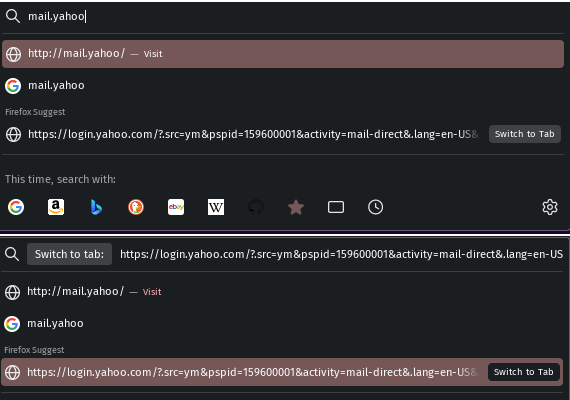
For example, say you have https://example.org/long/path open in a background tab already, and you want to open the same URI in your current tab, so you start typing example.org into the address bar. Autocomplete shows you https://example.org/long/path [Switch to Tab], so you scroll down and select it so you don't need to type the entire address with the long path into the address bar. Now the address bar says [Switch to Tab:] https://example.org/long/path, but you want to instead open the site in your current tab, and not switch to the already open tab. Clicking on the [Switch to Tab] icon in the address bar does nothing and doesn't get rid of it. Visually, the only option is to either hit enter, and thus switch to the already open tab, or change the address in some way that autocomplete doesn't recognize it as the address of an already open tab. The solution I found to this issue is to start typing in the address bar, which changes the address slightly, then delete the changes and it removes the [Switch to Tab:] badge, allowing you to just hit enter and open the address in your current tab. I don't think that behavior is intuitive or accessible. I think simply putting an exit icon like an x on the badge to be a good visual solution, like [x Switch to Tab:] https://example.org/long/path. Also, hitting the Esc key on your keyboard should also get rid of the [Switch to Tab:] badge from the address bar when you don't watch to switch to the tab. I attached a screenshot as an example.
... View more
Status:
New idea
Submitted on
13-09-2023
02:02 AM
Submitted by
FormaintInfo
on
13-09-2023
02:02 AM
Hello,
In previous versions, in the quota bar, the background was blue and the text was black.
Now, in the 115 version, the text is also blue !
Please, think to the low vision people.
Thank you.
... View more
It would be nice if there was the availability of a standardized and decent speech synthesis in reader mode too
... View more
I use shortcuts much but i also like to have it in private mode because i try to use private mode most of the time. Like listening to music on a youtube playlist. Google stuff gets deleted when closing tab/browser and you don't need to search every time for the playlist if you have a shortcut in private mode. this was just a example but you can use it for many other stuff like news sites or a website that you visit much but prefer use it in private mode.
... View more
Pressing TAB while browsing switches to/allows you to navigate links by keyboard. Unfortunately, if you're halfway down a page and hit TAB accidentally, the page jumps up to the top link, losing your place. This happens to me a lot! Since browsing the web by hitting TAB isn't very common (or easy), my suggestion is to have a prompt asking the user if they actually want to enter this "mode" when they hit TAB, just like the F7 (caret browsing) prompt:
... View more
Currently, the autofill popup (either for addresses, or for credit cards, or even simple saved data) is being shown only on secondary click/focus on the input field. It would be a lot better to be able to customize this and show the popup as soon as the entry gains focus
... View more
Thunderbird to Office 365 migration can be done manually using IMAP or through an automated migration tool. Before starting, ensure important Thunderbird data like Inbox, Sent Items, Drafts, Contacts, Calendar, Attachments, and Custom Folders are properly handled. The manual method requires adding the Office 365 account in Thunderbird via IMAP and OAuth2 authentication, then moving emails using drag-and-drop. Contacts can be transferred through the Address Book, while calendars must be exported as .ics files and imported separately into Outlook Web. However, users often face issues such as OAuth authentication failures, disabled IMAP, broken folder hierarchy, mailbox timeout errors, and missing calendar sync. Because of these limitations, many users prefer automated solutions like RecoveryTools Thunderbird to Office 365 Migrator. The software securely migrates Thunderbird emails, contacts, calendars, attachments, and metadata to Office 365 while preserving folder structure. It also supports bulk migration, advanced filters, and secure OAuth login for smooth and reliable data transfer.
... View more
Hallo Profis. In Thunderbird sind die Einstellungen nicht zentral erreichbar, sondern zum Teil in verschachtelten Untermenüs zu finden. Das ist extrem unübersichtlich, verwirrend und zeitraubend bei allen Einstellungsversuchen. Mein Vorschlag lautet deshalb: Bitte kreieren Sie ein Einstellungsmenü, in dem ALLE Einstellungsmöglichkeiten zusammen gelistet und gebündelt sind. Und zwar so: 1. Das Hauptmenü heisst "Einstellungen", der Button ist das bekannte Zahnrad. 2. Die Untermenüs heissen "Email-Einstellungen", "Kalender-Einstellungen" usw. 3. Im Untermenü "Email-Einstellungen" sind jetzt ALLE möglichen Einstellungsoptionen gelistet. Im Untermenü "Kalender-Einstellungen" sind jetzt ALLE möglichen Einstellungsoptionen gelistet. Das wäre eine sinnvolle Verbesserung des UI für alle User. Vielen Dank im Voraus. Peter
... View more
New Ideas and Feature Requests
Have an idea for a new product feature? You’re in the right place! This forum is for sharing and voting for ideas to improve Mozilla products. In case you have any questions about how the Ideas section operates, we’ve put together a few helpful articles:
Idea Statuses
- New idea 8,954
- Trending idea 62
- Needs more 2
- In review 12
- Exploring more 11
- In development 58
- Not right now 8
- Delivered 223
- Closed 44
Top Kudoed Authors
| User | Count |
|---|---|
| 127 | |
| 90 | |
| 84 | |
| 82 | |
| 82 |


Labels
-
Accessibility
353 -
Add-ons
304 -
Bookmarks
486 -
Calendar
34 -
Containers
132 -
Design
873 -
Desktop
1,211 -
DevTools
141 -
Environment
101 -
Firefox-Suggest
152 -
Focus
82 -
Hubs
16 -
Menu
11 -
Mobile
650 -
Mobile-Android
753 -
Mobile-iOS
344 -
Nightly
84 -
Password
288 -
PDF
153 -
Performance
181 -
PiP
95 -
Pocket
51 -
Privacy
16 -
Privacy & Security
413 -
Product Discussions
3 -
Relay
24 -
Search
403 -
Security
24 -
Sync
216 -
Tabs
852 -
Themes
113 -
Thunderbird
1,858 -
Thunderbird Android
266 -
Thunderbird for iOS
16 -
Toolbar
254 -
Translations
128 -
Video
136 -
VPN
55 -
WebCompat
8
