- Mozilla Connect
- Ideas
- When Login fails, please do not fail repeatedly wi...
- Subscribe to RSS Feed
- Mark as New
- Mark as Read
- Bookmark
- Subscribe
- Printer Friendly Page
- Report Inappropriate Content

- Subscribe to RSS Feed
- Mark as New
- Mark as Read
- Bookmark
- Subscribe
- Printer Friendly Page
- Report Inappropriate Content
I am trying to run Thunderbird version 153 on Ubuntu.
I have two Yahoo accounts among others.
On the previous version of Thunderbird at startup I could login to both Yahoo! accounts perfectly as well as the others.
(I assume that was version 152, because I do daily updates and so 153 - 1 = 152.)
When I first installed 153, on 24/7/2026, it asked me if I wanted to use the custom net.thunderbird connector, I do not know how I answered that question other than I have tried both answers and neither of them worked. I have since unchecked the box to ask the question by default and I do not know how to get it back nor which setting it is currently using.
Some documentation as to set this in the configuration settings would be good. and how to configure it to ask the question again would be great.
I noticed that DarkTrojan was one of the authors of this change, A user name that does not inspire confidence.
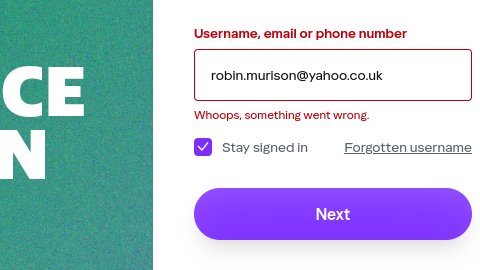
On version 153, the Yahoo OAuth2 page fails with the Error "Whoops, something went wrong." after entering the email address. But tells you nothing more.
It repeats this error over and over and will not let you cancel the login.
If you let it attempt to login repeatedly it will lock you out of your Yahoo! accounts. So having a clear option to cancel the login process would be a huge plus. Currently I have to quit Thunderbird and then fill out a bug report which so far I have done about 20 times.
IMPORTANT: If I could cancel these login attempts at least I could have access to my other email accounts.
The Yahoo credentials have not changed. When I test the connection using the "Test Connection to server" on the server settings page it all works perfectly.
When I start Thunderbird normally it fails as described above.
The bug dialog asks for the URL Used I have two one for each of my email addresses,
and
I have also attached a screen shot of one of the login attempts. the other is identical except with the other email address.
Notice that if I cut and paste these URL into Firefox they authenticate correctly but then fail to connect to Thunderbird on localhost, 127.0.0.1, so not that is not a useful work around just an indication that the URL's are initially correct.
- New idea 9,935
- Trending idea 59
- Needs more 2
- In review 12
- Exploring more 9
- In development 63
- Not right now 10
- Delivered 252
- Closed 47
