- Mozilla Connect
- Discussions
- No video playback on twitch and kick
- Subscribe to RSS Feed
- Mark Topic as New
- Mark Topic as Read
- Float this Topic for Current User
- Bookmark
- Subscribe
- Mute
- Printer Friendly Page

- Mark as New
- Bookmark
- Subscribe
- Mute
- Subscribe to RSS Feed
- Permalink
- Report Inappropriate Content
15-10-2026 11:43 PM

- Mark as New
- Bookmark
- Subscribe
- Mute
- Subscribe to RSS Feed
- Permalink
- Report Inappropriate Content
19-10-2026 01:53 AM
@xlyack : odd, as I've got the 158.0 update now on both a device running Windows 10 22H2 and Windows 11 25H2 and neither have the OpenH264 stuck waiting to install.
Not sure why when you've been updated from 157 to 158, this has now broken. But hopefully it'll be fixed in 159.
Did you try the other setting change I mentioned:
URL bar -> about:config -> ENTER -> search for media.wmf.media-engine.enabled ->
double-click it, change value to 0
Six people now in the Reddit post I linked to confirm it worked for them. You could maybe try that?
- Mark as New
- Bookmark
- Subscribe
- Mute
- Subscribe to RSS Feed
- Permalink
- Report Inappropriate Content
16-10-2026 01:09 AM
@xlyack : "No video playback on twitch and kick"
It's probably an extension you use causing it. Go to Menu -> Help and Report -> Troubleshoot Mode... and try Twitch and Kick in there. If they work fine, you'll know it's an extension.
So for any ad-block or script-block ones you have (e.g. AdGuard, Ghostery, NoScript, uBlock) or ones that change the theme of a page (e.g. Dark Reader), try disabling one of them on those pages, and refresh. If it's still broken, re-enable and try disabling another extension. Repeat until you find the one causing the issue.
If you still get issues with Twitch or Kick even in "Troubleshoot Mode", then it may be your Internet connection, anti-virus or anti-malware software or a VPN you use causing the issue. See if the sites work fine in a different browser on your device.
- Mark as New
- Bookmark
- Subscribe
- Mute
- Subscribe to RSS Feed
- Permalink
- Report Inappropriate Content
17-10-2026 08:04 AM
1. Didn't help
2. Didn't help either
3. Turned of antivirus and don't have vpn - did nort work.
other browsers working fine.
This issue appeared after latest update (158.0)
i also tried to refresh FF as new< deleted all cookies and settings of websites and cache. Still nothing
- Mark as New
- Bookmark
- Subscribe
- Mute
- Subscribe to RSS Feed
- Permalink
- Report Inappropriate Content
17-10-2026 11:36 AM
Hmm, okay, I can see a reports on r/Firefox on Reddit for Twitch:
https://www.reddit.com/r/firefox/comments/1x5g3vx/twitch_streams_arent_loading/
Nothing for Kick though.
As "Troubleshoot Mode" didn't work, that would rule-out an extension.
Type this in the URL bar, then press ENTER: about:preferences#tabsBrowsing
Scroll-down
Ensure "Play DRM-controlled content" is enabled
Then go to Menu -> Extensions and Themes -> Plugins
Make sure both the "OpenH264" and "Widevine" ones are set to enabled
If anything was disabled, test Twitch or Kick again
If you still have an issue, go back to about:preferences#tabsBrowsing
Scroll-down to "Use recommended performance settings" and untick it
Then "Use hardware acceleration when available" will appear; untick that also
That will avoid using the GPU in your system for any online video, which will mean you
may hear more fan-noise, as the CPU is being used more, and videos may be choppier,
especially if sped-up (e.g. 2x playback) and played at high resolutions. But if videos
then work, this would suggest a GPU driver issue.
- Mark as New
- Bookmark
- Subscribe
- Mute
- Subscribe to RSS Feed
- Permalink
- Report Inappropriate Content
17-10-2026 11:06 PM
- Mark as New
- Bookmark
- Subscribe
- Mute
- Subscribe to RSS Feed
- Permalink
- Report Inappropriate Content
18-10-2026 02:26 AM
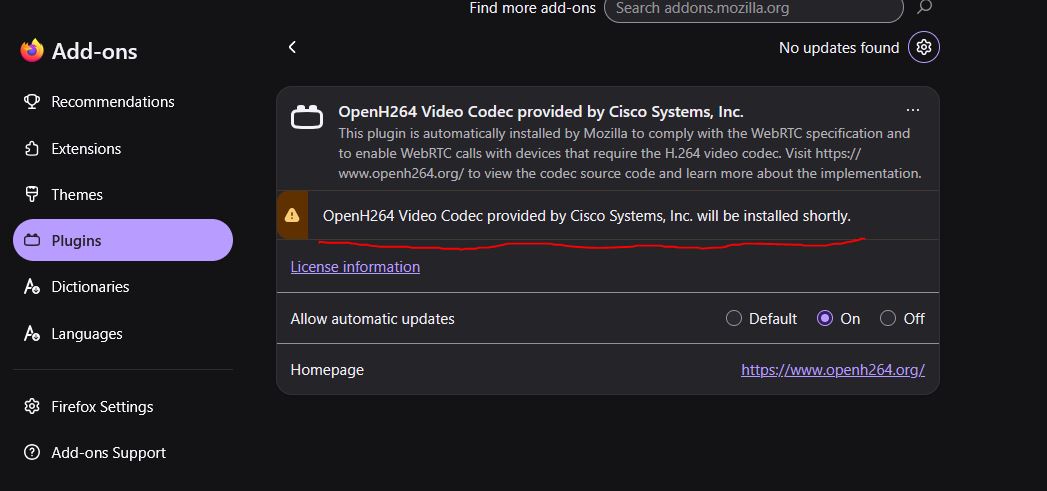
Go back to Menu -> Extensions and Themes -> Plugins
Click the "..." next to OpenH264 and in that menu check "Always activate" is chosen
Do the same for the Widevine one
Try closing all Firefox windows, wait 10-15 seconds, then bring a new one up.
Check if it's installed then.
If not, type about:preferences#connectionSecurity in the URL bar, then press ENTER
Choose "Don't enable HTTPS-Only mode"
Close all Firefox windows, and wait 10-15 seconds
Bring up a new Firefox window, and then see if the OpenH264 one gets installed
After it has, revisit about:preferences#connectionSecurity
And choose "Enable HTTPS-Only mode in all windows" for the best security
If that still doesn't work, are you using Linux? If so, might be worth doing a web
search for the name of your distro and Firefox OpenH264 will be installed shortly
and see if you need to run any commands in the Terminal.
On Windows or macOS just having the latest updates should be enough. The only
other things that might cause that component not to get installed on those systems
might be a VPN you use, or maybe your system is set to use specific DNS servers,
and they are not finding the server it pulls from.
- Mark as New
- Bookmark
- Subscribe
- Mute
- Subscribe to RSS Feed
- Permalink
- Report Inappropriate Content
18-10-2026 05:37 AM
Nope. Didn't work for me. i'm still there.
Windows here
- Mark as New
- Bookmark
- Subscribe
- Mute
- Subscribe to RSS Feed
- Permalink
- Report Inappropriate Content
18-10-2026 08:02 AM
@xlyack : I can see a number of reports now in r/Firefox for this. Have you tried any of the suggestions there?
One says type about:config in the URL bar, and press ENTER
Search for media.wmf.media-engine.enabled
Double-click that line, and change the value to 0
Five people there all say this worked (but one said it didn't for Kick):
https://www.reddit.com/r/firefox/comments/1x5g3vx/twitch_streams_arent_loading/
- Mark as New
- Bookmark
- Subscribe
- Mute
- Subscribe to RSS Feed
- Permalink
- Report Inappropriate Content
18-10-2026 08:05 AM
@xlyack : and if you're using the new beta version of Twitch, it seems they are forcing either Google Chrome or Microsoft Edge to be used:
https://www.reddit.com/r/firefox/comments/1x8ralq/twitch_streaming_beta_requires_chrome_or_edge/
You can try installing this extension, and make Firefox lie when on Twitch and report itself as being Google Chrome:
- Mark as New
- Bookmark
- Subscribe
- Mute
- Subscribe to RSS Feed
- Permalink
- Report Inappropriate Content
18-10-2026 09:55 PM
Chrome mask didn't help. I believe we found the problem, its .h264 codec plugin failing to install after latest update of FF. I guess the update is broken so i"m gonna have to wait untill next one
- Mark as New
- Bookmark
- Subscribe
- Mute
- Subscribe to RSS Feed
- Permalink
- Report Inappropriate Content
19-10-2026 01:53 AM
@xlyack : odd, as I've got the 158.0 update now on both a device running Windows 10 22H2 and Windows 11 25H2 and neither have the OpenH264 stuck waiting to install.
Not sure why when you've been updated from 157 to 158, this has now broken. But hopefully it'll be fixed in 159.
Did you try the other setting change I mentioned:
URL bar -> about:config -> ENTER -> search for media.wmf.media-engine.enabled ->
double-click it, change value to 0
Six people now in the Reddit post I linked to confirm it worked for them. You could maybe try that?
- Mark as New
- Bookmark
- Subscribe
- Mute
- Subscribe to RSS Feed
- Permalink
- Report Inappropriate Content
19-10-2026 06:04 AM
YES! finally it worked. Twitch and Kick work now. Thank you for your help!

- Severe audio bug on Twitch: old/initial audio track overlays live stream after pause (Firefox 158+) in Discussions
- Twitch overlapping audio bug after pausing stream in Discussions
- Could Firefox Improve the Experience of Watching Short Videos on Mobile? in Discussions
- closing essential tabs won't reset them, despite setting is activated in Discussions
