cancel
Showing results for 
Show  only  | Search instead for 
Did you mean: 
s1fly
Familiar face
Status: Trending idea

An idea for better media control in Firefox.

At the moment, if you need to quickly turn off audio playing on a tab, you need to find it and then right-click to mute the tab. There are no further controls available.

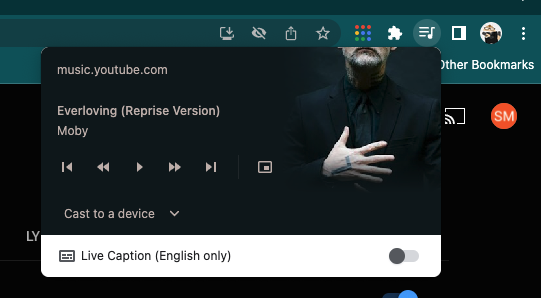
In Chrome, when you play a video or audio, a button appears on the toolbar.

Clicking this button shows a small panel of media control buttons allowing you to pause or skip tracks and even features some artwork. It would be amazing to implement some version of this in the Firefox toolbar.
57 Comments
abdelkad
Strollin' around

Already 2025, any updates?

GlockTwentyFive
Strollin' around

It's an essential feature, please add it.

Hraes
Making moves

So it has been selected as trending idea. Back in 2022. Now we are in the second half of 2025, but this function is still not available. I love FF, but it lacks serious and useful features which are available by default in other browsers.

Sanjaykrishnaob
New member

Still they haven't added this feature

E-N
Making moves

How does Firefox seriously not have this yet?


mdeni2914
Strollin' around

Would absolutely love to see this implemented!

hmijail
Making moves

FWIW, people using macOS have had this kind of thing as an OS-level feature already for a couple of major OS versions: an icon that appears in the menu bar whenever any app (Firefox or any other) plays audio, allowing to control each source independently.


MK2010GAMER
New member

I have been working on this exact problem and built a proof-of-concept extension to solve it. It creates a persistent global media controller by caching media session metadata using browser.storage.local.

You can see the open-source code and logic here: https://github.com/MK2010GAMER/mk-media-controller

I’d love to know if this approach aligns with the team's goals for a native implementation or if you have feedback on the media controller architecture!

MK2010GAMER_0-1779384249469.png

MK2010GAMER_1-1779384423275.png

MK2010GAMER_2-1779384546193.png


vin_phaethon
New member

after switching from Edge, it blows my mind that they don't have this feature. I found an extension, but extension stays on the toolbar even when no media is playing.

Axel63
Strollin' around

This is badly needed

drewk
New member

Add a global media control button for controlling media playback

I would like to suggest adding a dedicated media control button to Firefox, similar to the media controls available in Google Chrome and Microsoft Edge.

The button could appear in the Firefox toolbar and open a small pop-up listing all currently playing or paused media across open tabs.

For each media item, users could see basic information such as the title and website, along with controls to:

  • Play or pause the media

  • Seek backward or forward

  • Switch between different media sources currently open in Firefox

  • Quickly jump to the tab where the media is playing

This would be particularly useful when multiple tabs contain videos, music, streams, or other media. Users would not have to search through their tabs to find which one is currently playing.

The interface could be similar to the media control popup in Chrome and Edge, while following Firefox own design language.

I think this would be a useful quality-of-life feature for users who frequently have multiple media-heavy tabs open.

Thank you for considering this suggestion.

Jon
Community Manager
Community Manager

(Note: similar ideas have been merged into this thread)