- Mozilla Connect
- Ideas
- I’d like to propose a feature that would greatly e...
- Subscribe to RSS Feed
- Mark as New
- Mark as Read
- Bookmark
- Subscribe
- Printer Friendly Page
- Report Inappropriate Content

- Subscribe to RSS Feed
- Mark as New
- Mark as Read
- Bookmark
- Subscribe
- Printer Friendly Page
- Report Inappropriate Content
Concept
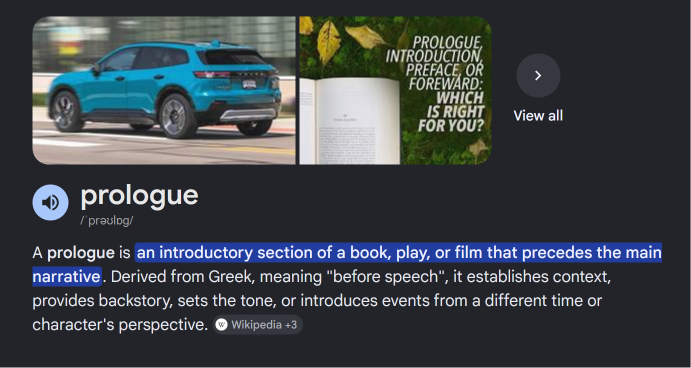
When reading a webpage or PDF in Firefox, users often encounter unfamiliar words. Currently, this requires switching tabs and searching externally. Instead, Firefox could offer a built‑in dictionary overlay:
-
Trigger: Selecting or hovering over a word prompts a small AI/star icon.
-
Dictionary Card: Clicking the icon opens a compact card (similar to Google’s knowledge panel) showing:
-
Definition
-
Example sentences
-
Pronunciation (with a speaker button for audio)
-
Customization
-
Source Selection: Users can choose their preferred dictionary provider (Oxford, Cambridge, Vocabulary.com, Dictionary.com, etc.).
-
Style Options: Minimal vs. detailed card layouts, dark/light theme integration.
-
Learning Mode: Option to save words into a personal “Word Bank” for later review, synced across devices.
Advanced Features
-
Offline Cache: Frequently looked‑up words stored locally for instant access.
-
AI Assistance: Simplified explanations or mnemonics for easier recall (e.g., “ephemeral = like Snapchat stories”).
-
Cross‑Platform Sync: Word bank and settings available on Firefox desktop and mobile.
Benefits
-
Eliminates the need to switch tabs for definitions.
-
Supports students, researchers, and casual readers with instant clarity.
-
Reinforces Firefox’s identity as a user‑centric, learning‑friendly browser.
This feature would transform Firefox into not just a browsing tool, but a personalized vocabulary companion.
Thank you for considering this idea.
Best regards,
Jaspreet
- New idea 9,801
- Trending idea 59
- Needs more 2
- In review 12
- Exploring more 9
- In development 63
- Not right now 9
- Delivered 251
- Closed 45
