- Mozilla Connect
- Discussions
- Re: Unsecure website download not working
- Subscribe to RSS Feed
- Mark Topic as New
- Mark Topic as Read
- Float this Topic for Current User
- Bookmark
- Subscribe
- Mute
- Printer Friendly Page
Unsecure website download not working

- Mark as New
- Bookmark
- Subscribe
- Mute
- Subscribe to RSS Feed
- Permalink
- Report Inappropriate Content
18-04-2024 06:03 AM - edited 18-04-2024 06:06 AM
I have a well hidden web server that uses HTTP. I need to download files from that server. After the newest update (125.0.1), Firefox now gives a warning about the website and on that warning is a button to "Allow Download".
However when I click on that button, the file that gets downloaded IS NOT the file that I was initially attempting to download. It looks like it is a copy of the web page that was being displayed at the time.
I noticed this behavior at work. I went home and used Firefox to connect to the server and everything connected and downloaded correctly. I went to see what version of Firefox was running. It was 124.0.2 and there was a button saying "Update Firefox". I clicked that button. My home Firefox updated to 125.0.1 and my home version of Firefox now also downloads the wrong file.

- Mark as New
- Bookmark
- Subscribe
- Mute
- Subscribe to RSS Feed
- Permalink
- Report Inappropriate Content
18-04-2024 06:36 AM - edited 18-04-2024 07:45 AM
Hello
Firefox release notes
https://www.mozilla.org/en-US/firefox/releases
https://bugzilla.mozilla.org/show_bug.cgi?id=1877195#c19
https://bugzilla.mozilla.org/show_bug.cgi?id=1892115
Try dom.block_download_insecure
Configuration Editor for Firefox https://support.mozilla.org/en-US/kb/about-config-editor-firefox
Search dom.block_download_insecure

- Mark as New
- Bookmark
- Subscribe
- Mute
- Subscribe to RSS Feed
- Permalink
- Report Inappropriate Content
18-04-2024 03:57 PM
Mozilla has issued a remote preference flip patch to temporarily revert to the earlier behavior. If you can't (or don't want to) modify the dom.block_download_insecure preference yourself, you can watch for this fix to be retrieved and installed automatically on your work computer. It should appear on the "about:studies" page and look like this:
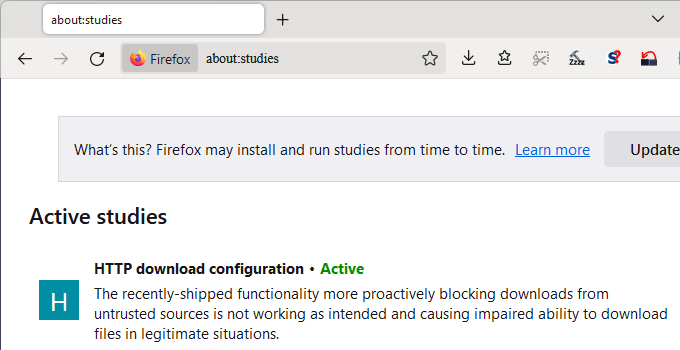
I don't know when Firefox 125.0.2 is expected to be issued (it may depend on other bugs discovered in recent days), but this preference change will also be included in that release.
- Mark as New
- Bookmark
- Subscribe
- Mute
- Subscribe to RSS Feed
- Permalink
- Report Inappropriate Content
19-04-2024 12:43 AM - edited 19-04-2024 01:09 AM
Hello
In adition
Normandy https://wiki.mozilla.org/Firefox/Normandy/PreferenceRollout
https://support.mozilla.org/en-US/kb/share-data-mozilla-help-improve-firefox
about:telemetry
Environment Data
Experiments https://bugzilla.mozilla.org/show_bug.cgi?id=1892259

With about:studies you can delete the study concerned if you wish.
In this case, dom.block_download_insecure will automatically be set to true by default.
- Mark as New
- Bookmark
- Subscribe
- Mute
- Subscribe to RSS Feed
- Permalink
- Report Inappropriate Content
22-04-2024 11:15 AM

- Mark as New
- Bookmark
- Subscribe
- Mute
- Subscribe to RSS Feed
- Permalink
- Report Inappropriate Content
13-11-2026 07:54 AM - edited 15-11-2026 07:13 AM
@joelswanson wrote:I have a well hidden web server that uses HTTP. I need to download files from that server. After the newest update (125.0.1), Firefox now gives a warning about the website https://gamepadtesterfree.com/ and on that warning is a button to "Allow Download".
However when I click on that button, the file that gets downloaded IS NOT the file that I was initially attempting to download. It looks like it is a copy of the web page that was being displayed at the time.
I noticed this behavior at work. I went home and used Firefox to connect to the server and everything connected and downloaded correctly. I went to see what version of Firefox was running. It was 124.0.2 and there was a button saying "Update Firefox". I clicked that button. My home Firefox updated to 125.0.1 and my home version of Firefox now also downloads the wrong file.
I also have the same question because I have noticed that Firefox's newer security warnings can interfere with downloads from HTTP websites. What is particularly concerning here is that clicking the "Allow Download" button appears to save a copy of the currently displayed webpage instead of the actual file requested from the server. Since everything worked correctly with version 124.0.2 and the problem started immediately after updating to 125.0.1, it seems possible that something changed in how Firefox handles downloads from HTTP connections. I would be interested to know whether this happens with every file type or only when downloading files through certain links or server configurations.

- Mark as New
- Bookmark
- Subscribe
- Mute
- Subscribe to RSS Feed
- Permalink
- Report Inappropriate Content
13-11-2026 11:53 AM
@joelswanson , @lintaglenn : does it help if you go to Menu -> Settings -> Privacy and Security -> Advanced settings (under the "Connection and software security" heading) -> Manage Exceptions... (under the "HTTPS-Only Mode" heading) -> enter the IP address of your server (e.g. http://10.11.12.13 ) and then click "Turn Off" followed by "Save Changes", to create a permanent exception?
TIP: to get to that area of the Firefox settings quicker, copy about:preferences#connectionSecurity into your URL bar, then press ENTER

- Thunderbird Mail Client - I am receiving 40+ Spam messages daily sometimes exceeding over 1 Mb of data. The filters don't work effectively as I want to remove them from the server not download them to my client. A better option that was on available in Discussions
- linux firefox drag and drop file from download popover doesn't work in Discussions
- Mozilla Update Release - Inconvenient in Discussions
- The "Show in folder" option does not work anymore when the file has been downloaded on a NAS drive . in Discussions
- Does Tubidy work properly on Firefox for music downloads? in Discussions
