- Mozilla Connect
- Discussions
- Re: Smart Window Beta Feedback
- Subscribe to RSS Feed
- Mark Topic as New
- Mark Topic as Read
- Float this Topic for Current User
- Bookmark
- Subscribe
- Mute
- Printer Friendly Page
Smart Window Beta Feedback


- Mark as New
- Bookmark
- Subscribe
- Mute
- Subscribe to RSS Feed
- Permalink
- Report Inappropriate Content
08-04-2026 10:58 AM - edited 21-04-2026 06:43 AM
Hi everyone,
We’re starting an early test of Smart Window in Firefox and wanted to create a place to gather feedback.

If you’re here from Firefox and already have access to Smart Window, please tell us what’s working, what isn’t, and what you’d want next. If you’re visiting this post and don’t see Smart Window in Firefox yet, that’s expected: we’re starting by inviting a small number of waitlist users. You can sign up for the waitlist here: https://www.firefox.com/en-US/smart-window/?view=waitlist
First, and most important: the Firefox you already know isn’t changing. Your regular and private browsing windows work exactly as they do today.
Smart Window is a separate, optional window in Firefox where you can interact with an AI assistant of your choice while you browse, intended to think with you, not for you. It’s designed to help you:
- Stay in your flow: summarize what you’re reading, ask questions, and get help without bouncing between tabs and tools
- Work across tabs: compare information and organize what you’re looking at while researching or planning.
A few things we want to be clear about:
- Fully optional: the Smart Window assistant lives in its own window, and requires signing up using a Firefox Account
- You’re in control: you decide if and when to use it, and what context it can access
- Transparent by design: it shows what information it’s using, like your current session or history, and you can toggle that on or off
- No lock-in: you can choose between models or bring your own
- Built on Firefox’s privacy foundation: we don’t sell your data or track where you go, and conversations aren’t retained
- Respects Firefox AI Controls: if you’ve chosen to limit AI features, Smart Window won’t override those settings
This is still early, and we know AI in browsers raises real questions around trust, usefulness, and control. We’re trying to build this in a way that’s transparent and genuinely helpful in day-to-day browsing, but this is very much a work in progress.
Because this post is public, not everyone reading it will have access yet. That’s okay. General thoughts are welcome, and hands-on feedback from people using Smart Window in Firefox right now will be especially helpful as we improve it.
Thanks for helping shape where this goes.

- Mark as New
- Bookmark
- Subscribe
- Mute
- Subscribe to RSS Feed
- Permalink
- Report Inappropriate Content
29-04-2026 06:42 AM
A couple of times a new inquiry still references the previous one.

- Mark as New
- Bookmark
- Subscribe
- Mute
- Subscribe to RSS Feed
- Permalink
- Report Inappropriate Content
04-05-2026 10:53 AM
Looking at the screenshot, what you may be noticing is that the current tab ("Amazon.com Astropad...") is attached by default to the assistant input. This can be dismissed by "x"ing out of the attached tab.
Additionally, chat data isn't stored after the model provides a response. In order to keep a track of conversation context, all previous chats in the conversation is sent with each new "inquiry".
To start fresh, you can use the "New chat" button at the top of the assistant UI.

- Mark as New
- Bookmark
- Subscribe
- Mute
- Subscribe to RSS Feed
- Permalink
- Report Inappropriate Content
30-04-2026 07:49 AM
I have bookmark shortcuts set up to work in the normal Firefox window and I rely on these to open many sites. They don't seem to work in the smart window, meaning most of the time I would need to have the smart window off, which isn't ideal.
- Mark as New
- Bookmark
- Subscribe
- Mute
- Subscribe to RSS Feed
- Permalink
- Report Inappropriate Content
04-05-2026 10:57 AM
Fairly certain you're referring to shortcuts on the New Tab. The Smart Window beta New Tab page is intentionally minimal, but these shortcuts are really valuable and not something we want to regress. We're working through how to add these back in and should have a fix soon.

- Mark as New
- Bookmark
- Subscribe
- Mute
- Subscribe to RSS Feed
- Permalink
- Report Inappropriate Content
26-05-2026 05:01 PM
They could also be referring to bookmark keywords. They still work in the address bar but not the input on the new tab page. Similarly, the keywords you can assign to search engines and the fixed keywords for the internal filters (e.g. @history) do not work on the new tab page.

- Mark as New
- Bookmark
- Subscribe
- Mute
- Subscribe to RSS Feed
- Permalink
- Report Inappropriate Content
28-05-2026 12:11 AM - edited 28-05-2026 12:13 AM
Edit: answer deleted
- Mark as New
- Bookmark
- Subscribe
- Mute
- Subscribe to RSS Feed
- Permalink
- Report Inappropriate Content
30-04-2026 10:25 AM
There's a tiny bit of lag between command+T and when the smart window captures the next character typed that isn't there in the normal window. I'm finding my first letter is cut off if I'm moving fast.
Generally I'm finding that most of the time I want my normal "new tab" experience (default to search what I type, auto-fill my recent doc URLs, etc) but with AI option as a secondary (perhaps with an extra modifier like shift-enter) rather than what it is now (default to AI and not sure if there's a shortcut that would do the default new tab behavior for what I type)
- Mark as New
- Bookmark
- Subscribe
- Mute
- Subscribe to RSS Feed
- Permalink
- Report Inappropriate Content
04-05-2026 11:28 AM
Thanks for the feedback.
Trying to reproduce the lag, and I may just not be as fast as you! I'll file that issue; it's entirely possible that the Smartbar input is introducing some latency that we need to address.
Broad agreement that the current New Tab experience in Smart Window needs to be improved.
The question of "default to AI" in Smart Window is an interesting one. Generally we are treating Smart Window as a place to be consciously more AI forward. That said, we're trying to balance that posture against the backdrop of the wide variety of experiences that a browser needs to support.
Today, the Smartbar has a local language model that attempts to classify user input as appropriate either for navigation (e.g. resolve a url), traditional web search (via your preferred default engine), and AI chat. You can override this decision by using this action picker:

- Mark as New
- Bookmark
- Subscribe
- Mute
- Subscribe to RSS Feed
- Permalink
- Report Inappropriate Content
30-04-2026 11:43 AM
When adding a new tab, it drops the toolbar from the new tab page. Prefer keeping it there to access my shortcuts.
Also, as mentioned by others, the smart window popping up is very aggressive. I use my mouse shortcut to open up links in a new tab often and it will have the smart window enabled. Prefer to to enable when I need it and not automatically.


- Mark as New
- Bookmark
- Subscribe
- Mute
- Subscribe to RSS Feed
- Permalink
- Report Inappropriate Content
04-05-2026 11:15 AM
Thanks for reporting! Missing bookmarks on the Smart Window New Tab is a bug.
Hoping to understand what you mean by "mouse shortcut". We're adding more options to the context menu (that shows when you right click links) which might be related.
Also keen for any additional information you're able to share on what you mean by "Smart Window popping up".
- Mark as New
- Bookmark
- Subscribe
- Mute
- Subscribe to RSS Feed
- Permalink
- Report Inappropriate Content
04-05-2026 12:49 PM
I have my mouse programmed to open a link into a new tab in the background with the scroll wheel button. I'll use that to create new tabs from links I come across in that article that I want to reference later.
When I go over to the new tab, the smart window on the right is automatically opened.

- Mark as New
- Bookmark
- Subscribe
- Mute
- Subscribe to RSS Feed
- Permalink
- Report Inappropriate Content
04-05-2026 04:42 PM
Thanks so much for clarifying. The auto-open behavior for the assistant sidebar is indeed a common point brought up by beta testers.

- Mark as New
- Bookmark
- Subscribe
- Mute
- Subscribe to RSS Feed
- Permalink
- Report Inappropriate Content
30-04-2026 06:16 PM
I have used Firefox for many years. Now they seem to be making 'helpful' changes'. Firefox has been making changes that are supposed to make the consumer more happy. I am not happy! Every time I log in it seems that my use of the site becomes more confusing. 20 years - a good choice - now not so.

- Mark as New
- Bookmark
- Subscribe
- Mute
- Subscribe to RSS Feed
- Permalink
- Report Inappropriate Content
02-05-2026 05:22 AM
The functionality required to make this work as anything other than the sidebar we already had is something that should be exposed to addon APIs.
And then we take this mess out of Firefox and put it into an extension.

- Mark as New
- Bookmark
- Subscribe
- Mute
- Subscribe to RSS Feed
- Permalink
- Report Inappropriate Content
07-05-2026 12:30 PM
It seems like math equations outputted by the model are not being rendered

- Mark as New
- Bookmark
- Subscribe
- Mute
- Subscribe to RSS Feed
- Permalink
- Report Inappropriate Content
14-05-2026 02:35 AM
Once the Smart Window opens, I can't log in with a different account. For some reason, Firefox thinks I can only log in with the last account I used. In my case, that's my Bugzilla account, which I really don't want to use for this purpose, but the only alternative login options offered are via Gmail or Apple.
How do I log in with the account specifically intended for testing Smart Window?

- Mark as New
- Bookmark
- Subscribe
- Mute
- Subscribe to RSS Feed
- Permalink
- Report Inappropriate Content
14-05-2026 07:59 AM
Thanks for reporting. This is a known limitation due to your profile being tied to your account.
In order to log in with a different account, you will need to log out, create a new Firefox profile and then sign in with a different account.
- Mark as New
- Bookmark
- Subscribe
- Mute
- Subscribe to RSS Feed
- Permalink
- Report Inappropriate Content
14-05-2026 09:37 AM - edited 14-05-2026 09:43 AM
That’s probably another problem—it’s impossible to log out of the current account. I log out, try to log back in, and find that without any login screen or password prompt, I’m back in the same account.
- Mark as New
- Bookmark
- Subscribe
- Mute
- Subscribe to RSS Feed
- Permalink
- Report Inappropriate Content
14-05-2026 09:42 AM
The post above was written WITHOUT logging into my account (I saw the "Sign In" menu at the top). As soon as I clicked the "Reply" button, the post was automatically published without me logging in, so it was sent without being translated. And now I see that I'm logged in.
So, there's no way to log in under a different name.

- Mark as New
- Bookmark
- Subscribe
- Mute
- Subscribe to RSS Feed
- Permalink
- Report Inappropriate Content
14-05-2026 09:48 AM - edited 14-05-2026 09:51 AM
I'm trying to post again while logged out. The menu looks like this (I can't add an image right now, because I can't upload photos without logging in).
I can't edit my first reply. I'm sure that if I click "Reply," the post will be published without any login window, as if it were from the user "KEdas."
Edit a few seconds later: I was right—I logged in automatically. Now I'm adding the photos.



- Mark as New
- Bookmark
- Subscribe
- Mute
- Subscribe to RSS Feed
- Permalink
- Report Inappropriate Content
20-05-2026 09:55 AM
While I'm happy that Mozilla provide this ability, it would be nice if the smart window can workaround censorship about China embedded in the Chinese models, as it would promote the biased and harmful mindset against democracy and freedom, which is against the principles of Mozilla. It can be effectively achieved by either system prompts or routing to other uncensored models for those topics.

- Mark as New
- Bookmark
- Subscribe
- Mute
- Subscribe to RSS Feed
- Permalink
- Report Inappropriate Content
26-05-2026 09:35 AM
I think there should be a reasoning toggle in Smart Window for AI models. Sometimes you want the model to handle a tougher task, but it doesn’t always manage it. Also, I’d like to see the same integration as in the AI sidebar.
I also noticed that the hover states in the browsing selection are right up against each other, which doesn’t look very good.


- Mark as New
- Bookmark
- Subscribe
- Mute
- Subscribe to RSS Feed
- Permalink
- Report Inappropriate Content
26-05-2026 10:51 AM
I am finding the beta to be extremely hard to use, and I'm not sure if it is just terribly, terribly slow, buggy, if I'm using it incorrectly, or my system is mis-configured.
Whenever I type in a prompt and key enter, it defaults to a google search instead of going to the engine.
This is feels like a worst case scenario for me as a privacy-aware user, because now I'm just piping my queries to google? This happens every.single.time - unless I click out of the interface with my mouse, then select Ask from the drop-down.
The prompt at the beginning suggesting it was going to use a Gemini model for "fast" answers led me to believe that maybe the window was just relaying things over to google search AI assistant, but I don't think that is the case - it's just doing a google search on my query by default.
(Unable to add screenshots of this in action due to forum permissions)
When I did figure out how to ask basic queries of the window, it just hangs - for twenty minutes or more, I gave up on it. I can't get a response and I have no idea if it is bugged or something bad in my config.
Really appreciate what y'all are trying to do and looking forward to seeing it improve over time.

- Mark as New
- Bookmark
- Subscribe
- Mute
- Subscribe to RSS Feed
- Permalink
- Report Inappropriate Content
26-05-2026 02:44 PM
My first search: Asked Smart Window to compare Samsung vs LG TVs. It never returned results. Tried again on a specific page (https://www.talkofthehouse.com/samsung-vs-lg-tvs/), and it didn't return results.

- Mark as New
- Bookmark
- Subscribe
- Mute
- Subscribe to RSS Feed
- Permalink
- Report Inappropriate Content
26-05-2026 11:02 PM
This looks incredibly exciting! However, I’m running into a frustrating block: whenever I submit a question in the main Smart Window screen, the chat gets stuck in a continuous loading loop. I have already tried troubleshooting on my end by switching between the Fast, Flexible, and Personal models, but the issue persists across all of them. Every attempt simply times out after a minute with the error, "Something went wrong. Please try again." What are the next steps to fix this?

- Mark as New
- Bookmark
- Subscribe
- Mute
- Subscribe to RSS Feed
- Permalink
- Report Inappropriate Content
27-05-2026 01:10 PM
it's interesting so far;
i would (be able to) use it more often if i could start it and navigate it with the keyboard, eg:
- allow making the AI mode the default
- launch directly into the AI mode, eg with a URL/CLI option
- `firefox --new-window chrome://browser/content/aiwindow/aiWindow.html`
- keybinding to open/close the chat sidebar, or toggle focus
- eg in classic mode, Ctrl-Alt-X does this
- eg in classic mode, F6 jumps between split view panes

- Mark as New
- Bookmark
- Subscribe
- Mute
- Subscribe to RSS Feed
- Permalink
- Report Inappropriate Content
27-05-2026 11:54 PM
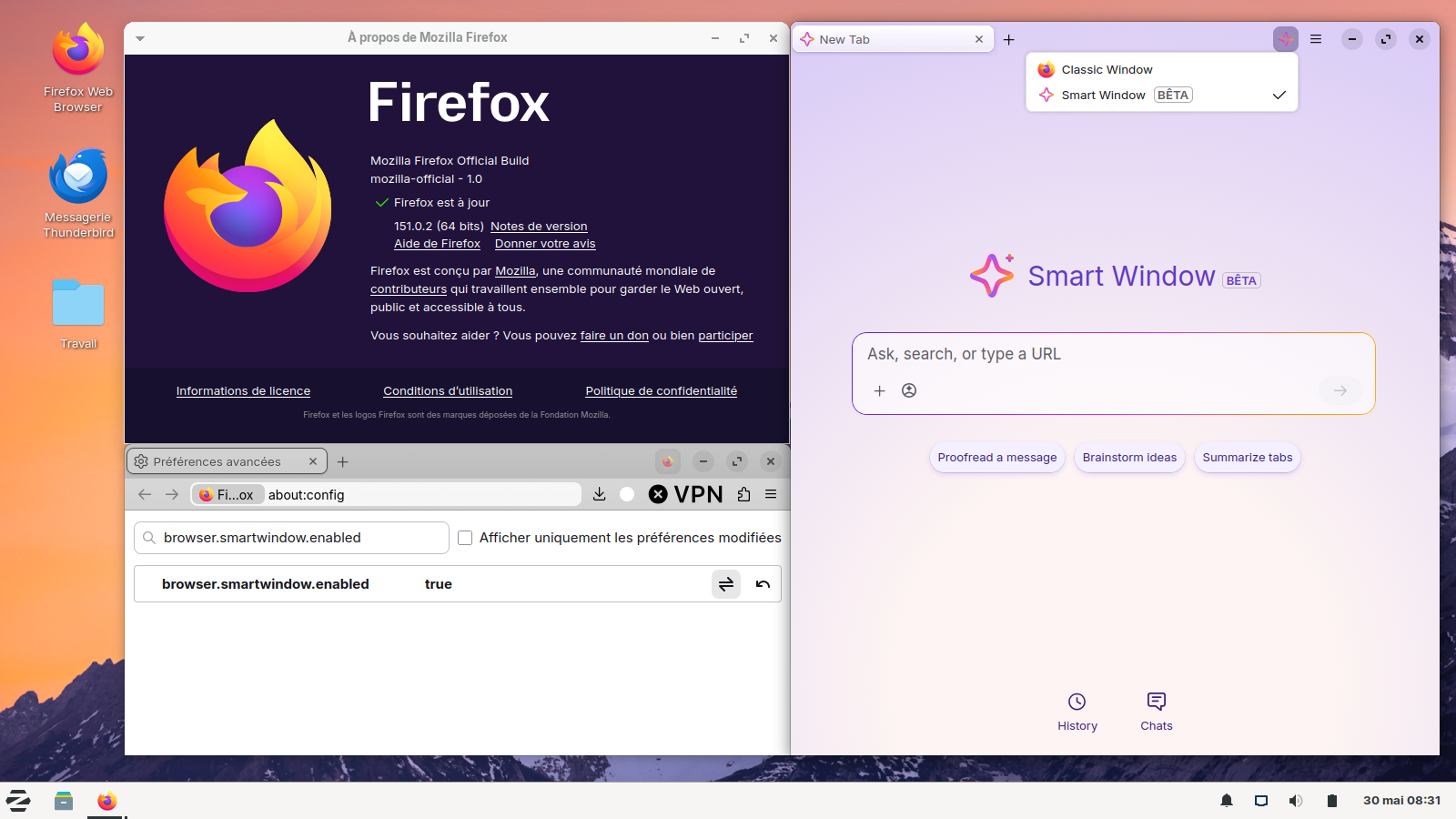
I received the email message stating I am in the Smart Window beta test.
I checked that my browser is updated (currently Firefox 151) and that I am logged in with my Mozilla account. Still I cannot see the "New Smart window" menu item.
Can you please help me troubleshoot this, or point me to relevant documentation?
Thanks
Luca
- Mark as New
- Bookmark
- Subscribe
- Mute
- Subscribe to RSS Feed
- Permalink
- Report Inappropriate Content
28-05-2026 12:17 AM - edited 28-05-2026 12:57 AM
- Mark as New
- Bookmark
- Subscribe
- Mute
- Subscribe to RSS Feed
- Permalink
- Report Inappropriate Content
28-05-2026 10:49 AM
After the upgrade, do you have the regular Firefox logo in the title bar? If so, click on the logo and it will give you a choice between Smart and Classic.
- Mark as New
- Bookmark
- Subscribe
- Mute
- Subscribe to RSS Feed
- Permalink
- Report Inappropriate Content
01-06-2026 03:56 AM
Thanks for all the answers, I can confirm that setting
browser.smartwindow.enabledenables the functionality.
Luca

- Mark as New
- Bookmark
- Subscribe
- Mute
- Subscribe to RSS Feed
- Permalink
- Report Inappropriate Content
28-05-2026 11:44 AM
Received invite but the feature is not available. Tested 3 different OSes (win11 x64, win11 arm, ubuntu 26.04) on 3 different machines. All running 151 or later.
- Mark as New
- Bookmark
- Subscribe
- Mute
- Subscribe to RSS Feed
- Permalink
- Report Inappropriate Content
28-05-2026 11:48 PM - edited 29-05-2026 11:36 PM
- Mark as New
- Bookmark
- Subscribe
- Mute
- Subscribe to RSS Feed
- Permalink
- Report Inappropriate Content
29-05-2026 02:48 PM
Thanks!

- Mark as New
- Bookmark
- Subscribe
- Mute
- Subscribe to RSS Feed
- Permalink
- Report Inappropriate Content
07-06-2026 12:28 PM
I've asked smart window to summarize some pages, and it seems it was missing a lot. Looking at requests made behind the scene, the get_page_content tool only returns ~10000 characters from the page, so the summary lacks a lot if the page is big.
- Mark as New
- Bookmark
- Subscribe
- Mute
- Subscribe to RSS Feed
- Permalink
- Report Inappropriate Content
09-06-2026 04:13 PM
A suggestion, maybe it's there already and I missed it, a thumbs-up/down selector on the results. I've been getting some spot-on responses of late.

- Mark as New
- Bookmark
- Subscribe
- Mute
- Subscribe to RSS Feed
- Permalink
- Report Inappropriate Content
17-06-2026 07:37 AM
I just read the info page about how much it respects your privacy, data stays on your computer - not firefox server, and it stores very minimal to no info about you. I decide that sounds good and want to try it. First thing it requires is Sign In to your account. That doesn't seem very privacy-oriented to me. Feels like a bait and switch. I will not try it now.
- Mark as New
- Bookmark
- Subscribe
- Mute
- Subscribe to RSS Feed
- Permalink
- Report Inappropriate Content
17-06-2026 10:21 AM - edited 17-06-2026 10:28 AM
I've been trying it, with local models only.
The UI makes a lot of background requests. The conversation starter requests make the interface almost unbearably slow when the model is allowed to reason, as it will have to generate a thousand tokens (or more) every time you navigate.
On the other hand, turning off reasoning makes models really dumb, especially when they're supposed to be using tool calls (to read page content) and the chat becomes disappointing or even broken.
I wish I could turn off the conversation starters, or the interface would explicitly control reasoning for requests.
Also, clicking on a starter does not produce a request with the "current page context" (unlike manually entering a chat message) and so most of the time the model responds with confusion and asks for more context.
Also, the endless animation of the placeholder text (scrolling between "Enter a web address...", "Search the web...", etc) is distracting and annoying.

- Mark as New
- Bookmark
- Subscribe
- Mute
- Subscribe to RSS Feed
- Permalink
- Report Inappropriate Content
17-06-2026 10:36 AM - edited 17-06-2026 10:38 AM
Not a bad start, but needs some work. Design is great so far. Wish there were more model options than just Google, Alibaba, and OpenAI, ie Mistral has open source models in all three sizes (iirc). Then if we’re restricting model choice to open source, why not have options to have run on device (hardware permitted)? If all of this is sending and processing over the cloud with usage restrictions anyway, why not allow Claude, Proton Lumo, etc other cloud models? I’m not pleased that there isn’t any full disclosure of what data centers are processing all of this either, regardless of privacy measures baked in. I see there’s a BYOM config which is mostly a remedy in theory for advanced users, but should be easier to setup and be optimized to perform just as well plugging into other most popular model providers. Got a lot of work to do and not a lot of time before Apple supercharges Safari later this year with what seems to be vastly superior on device AI and browsing.

- Mark as New
- Bookmark
- Subscribe
- Mute
- Subscribe to RSS Feed
- Permalink
- Report Inappropriate Content
17-06-2026 05:54 PM
None of the models seem to work. They all say "Something went wrong. Please try again." immediately, and the try again button does nothing.


- Mark as New
- Bookmark
- Subscribe
- Mute
- Subscribe to RSS Feed
- Permalink
- Report Inappropriate Content
19-06-2026 08:15 AM
On the smart window, I lose the hamburger menu.



- Mini Window beta is going live in Firefox 160 and we want your feedback in Discussions
- Firefox smart window in Discussions
- Smart Window expands to France, with Mistral as a new model option in Discussions
- Feedback on the new UI: corner rounding, dark theme, and window density in Discussions
- smart window in Discussions
