- Mozilla Connect
- Discussions
- Dropdown menus don't work in new 99.0 version
- Subscribe to RSS Feed
- Mark Topic as New
- Mark Topic as Read
- Float this Topic for Current User
- Bookmark
- Subscribe
- Mute
- Printer Friendly Page

- Mark as New
- Bookmark
- Subscribe
- Mute
- Subscribe to RSS Feed
- Permalink
- Report Inappropriate Content
08-04-2022 03:26 AM - edited 08-04-2022 03:34 AM
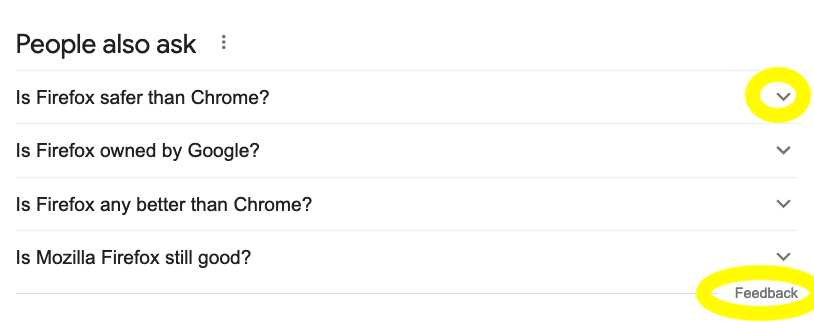
With the new 99.0 update, the dropdown menus on Google- and maybe other places don't work. If I refresh the page a few times, it *sometimes* works. But usually not.
I'm talking about the down pointing carret symbol used to expand a list: V
For example you see it on web pages like this, you click it to show a drop-downlist:
What is the best car? V
What is the best bike? V
Also the text links that go with these sections of the page do not work, even though you get the pointing finger icon when moused over.
Solved! Go to Solution.
- Mark as New
- Bookmark
- Subscribe
- Mute
- Subscribe to RSS Feed
- Permalink
- Report Inappropriate Content
12-04-2022 12:21 AM
Well the problem seems to have gone away after I tested it a few times. Previously restarting firefox did nothing to solve it. Maybe something related has cleared it up.
- Mark as New
- Bookmark
- Subscribe
- Mute
- Subscribe to RSS Feed
- Permalink
- Report Inappropriate Content
12-04-2022 12:21 AM
Well the problem seems to have gone away after I tested it a few times. Previously restarting firefox did nothing to solve it. Maybe something related has cleared it up.

- Mark as New
- Bookmark
- Subscribe
- Mute
- Subscribe to RSS Feed
- Permalink
- Report Inappropriate Content
30-01-2026 11:15 AM - edited 30-01-2026 11:16 AM
It looks like a browser bug introduced in the latest update, affecting dropdown interactions and clickable elements. Clearing cache, disabling extensions, or rolling back the update may help for now while you explore smoother experiences like quad bike rental dubai without tech hiccups.

- Right-click context menu renders blank/empty on Firefox in Discussions
- Similar UIs in Discussions
- The Beta version and no menu bar in Discussions
- new mobile app tabs screen is counterproductive to a decent mobile experience in Discussions
- Search bar with multiple search engines in Firefox 149.0 in Discussions
