- Mozilla Connect
- Discussions
- 157.0 made bookmarks sparce again. How to restore ...
- Subscribe to RSS Feed
- Mark Topic as New
- Mark Topic as Read
- Float this Topic for Current User
- Bookmark
- Subscribe
- Mute
- Printer Friendly Page

- Mark as New
- Bookmark
- Subscribe
- Mute
- Subscribe to RSS Feed
- Permalink
- Report Inappropriate Content
29-09-2026 11:15 AM
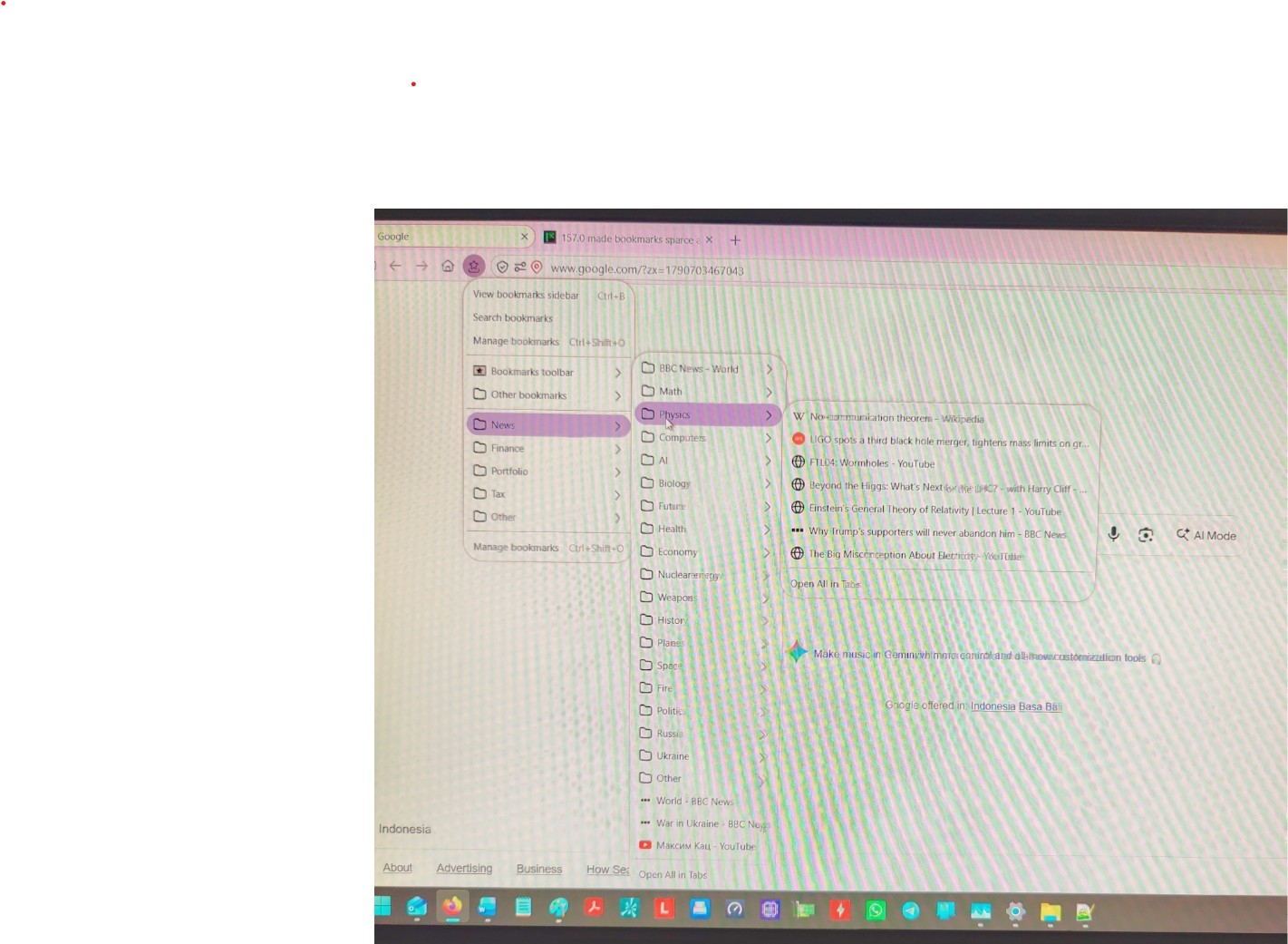
157.0 made bookmarks sparce again. How to restore high density? Old methods dont help.
This doesnt help:
"With the release of Firefox 157 and its new "Nova" visual design refresh, Mozilla actually brought back Compact Mode as a fully supported native setting. You no longer need to mess with hidden about:config flags or the "Customize Toolbar" menu.
To fix the sparse padding and restore high-density spacing for your bookmarks and toolbars, follow these steps:
1. Click the Menu button (three horizontal lines) in the top-right corner of Firefox.
2. Select Settings.
3. Choose Appearance from the left-hand sidebar menu.
4. Locate the Window density section.
5. Select Compact."
Solved! Go to Solution.
- Mark as New
- Bookmark
- Subscribe
- Mute
- Subscribe to RSS Feed
- Permalink
- Report Inappropriate Content
01-10-2026 10:27 AM - edited 01-10-2026 10:35 AM
In about:config I set toolkit.legacyUserProfileCustomizations.stylesheets to true
and added
menupopup > menuitem,
menupopup > menu {
padding-top: 4px !important;
padding-bottom: 4px !important;
}
to the beginning of my existing userChrome.css file.
This restores the pre-157 spacing. Thank you benalvi!
- Mark as New
- Bookmark
- Subscribe
- Mute
- Subscribe to RSS Feed
- Permalink
- Report Inappropriate Content
29-09-2026 11:17 AM


- Mark as New
- Bookmark
- Subscribe
- Mute
- Subscribe to RSS Feed
- Permalink
- Report Inappropriate Content
29-09-2026 11:28 AM
In the about:config screen, try setting "browser.nova.enabled" to "false"
- Mark as New
- Bookmark
- Subscribe
- Mute
- Subscribe to RSS Feed
- Permalink
- Report Inappropriate Content
29-09-2026 11:34 AM
I tried, no effect.
- Mark as New
- Bookmark
- Subscribe
- Mute
- Subscribe to RSS Feed
- Permalink
- Report Inappropriate Content
29-09-2026 11:49 AM
Odd, I'm using the "compact" mode and have "browser.nova.enabled" set to "false" and my bookmarks are not as spaced-out
Two things you can check:
Right-click an empty area of the Firefox toolbar, and do "Customise Toolbar..."
Click "Density" at the bottom and make sure "Use touch for Tablet Mode" isn't enabled
Next
In the Settings app in Windows 11, on the "System" page look at "Scale" and it's probably set to something like 125% or 150% and not 100%, as mine is. So this might be causing the extra padding.
The only way to change that would be to go into C:\Program Files\Mozilla Firefox , right-click firefox.exe and go to the Compatibility tab, then click "Change high DPI settings" then click "Override high DPI scaling behaviour" and try a different setting. You must fully-close Firefox between each time you change that setting, then re-open it, to see any change take effect

- Mark as New
- Bookmark
- Subscribe
- Mute
- Subscribe to RSS Feed
- Permalink
- Report Inappropriate Content
29-09-2026 02:22 PM
This was introduced in 157.0. The 156.01 was much more dense. I don't want to make everything smaller by changing DPI. I want the lines in bookmarks window to be closer to each other, the way they were in previous versions, without changing the letter size.
- Mark as New
- Bookmark
- Subscribe
- Mute
- Subscribe to RSS Feed
- Permalink
- Report Inappropriate Content
29-09-2026 02:25 PM

- Mark as New
- Bookmark
- Subscribe
- Mute
- Subscribe to RSS Feed
- Permalink
- Report Inappropriate Content
29-09-2026 02:30 PM
- Mark as New
- Bookmark
- Subscribe
- Mute
- Subscribe to RSS Feed
- Permalink
- Report Inappropriate Content
29-09-2026 02:30 PM

- Mark as New
- Bookmark
- Subscribe
- Mute
- Subscribe to RSS Feed
- Permalink
- Report Inappropriate Content
29-09-2026 04:42 PM

- Mark as New
- Bookmark
- Subscribe
- Mute
- Subscribe to RSS Feed
- Permalink
- Report Inappropriate Content
30-09-2026 12:36 AM
Yes, at first I didn't notice the change in the spacing, but I can see it now (initially I wondered if it might be a Windows difference, as my device is on Windows 10).
The best thing to do is a Google search for how to change this using the userChrome.css file, which lets you customise size and spacing for various parts of the Firefox UI. It's a bit beyond my scope, but if you do a search with that file name included you'll likely find someone on Reddit has done the steps on it before now
- Mark as New
- Bookmark
- Subscribe
- Mute
- Subscribe to RSS Feed
- Permalink
- Report Inappropriate Content
30-09-2026 02:05 AM
Yes, it's so annoying that they have to introduce those regressions regularly. Why change something that works?

- Mark as New
- Bookmark
- Subscribe
- Mute
- Subscribe to RSS Feed
- Permalink
- Report Inappropriate Content
30-09-2026 11:10 AM
Exactly, the latest update to 157 today has increased the padding in my drop-down menus, and there's nothing that will put it right. I've tried all the workarounds. Compact is not as compact as it was. I'm really angry about this. I just wish they'd concentrate on the security updates, and leave the cosmetics well alone. STOP MESSING !!!!!
- Mark as New
- Bookmark
- Subscribe
- Mute
- Subscribe to RSS Feed
- Permalink
- Report Inappropriate Content
30-09-2026 03:59 PM - edited 30-09-2026 03:59 PM
Yes, these updates are constantly introducing features nobody cares about, but breaking something useful. It feels like the goal of Firefox team is to make me switch to another browser! The compact bookmarks was the only thing that kept me from switching to Chrome. STOP MESSING !!!!!
- Mark as New
- Bookmark
- Subscribe
- Mute
- Subscribe to RSS Feed
- Permalink
- Report Inappropriate Content
30-09-2026 11:16 AM
@Agentvirtuel : explain to the user how they can decrease the padding between menu items, such as bookmarks, after the Firefox 157.0 update. Assume the user has already made the browser.nova.enabled to false change in about:config , and has set the UI density to "compact" mode.
Explain what changes the user should make in the "userChrome.css" file to achieve this, explaining where that file is usually located. Also remember to say "toolkit.legacyUserProfileCustomizations.stylesheets" must be set to "true" in about:config for the .css file changes to take-effect.
Be sure your solution is valid for Firefox 157.0 release; don't rely on old training data that may now be obsolete and not work in the latest version.

- Mark as New
- Bookmark
- Subscribe
- Mute
- Subscribe to RSS Feed
- Permalink
- Report Inappropriate Content
30-09-2026 10:19 PM
Bonjour
My answer, this article https://support.mozilla.org/en-US/kb/contributors-guide-firefox-advanced-customization
I found your message among the many messages.

- Mark as New
- Bookmark
- Subscribe
- Mute
- Subscribe to RSS Feed
- Permalink
- Report Inappropriate Content
30-09-2026 11:51 PM
Please provide the exact steps the user needs to make in the "userChrome.css" file to resolve this issue: what exact lines of code should they add to it?
- Mark as New
- Bookmark
- Subscribe
- Mute
- Subscribe to RSS Feed
- Permalink
- Report Inappropriate Content
30-09-2026 11:56 PM
A user above has suggested these edits inside the userChrome.css file:
menupopup > menuitem,
menupopup > menu {
padding-top: 2px !important;
padding-bottom: 2px !important;
}
Please test these and check if they work
- Mark as New
- Bookmark
- Subscribe
- Mute
- Subscribe to RSS Feed
- Permalink
- Report Inappropriate Content
01-10-2026 12:17 AM - edited 01-10-2026 12:42 AM
If you wish to try
Copy/paste the code into your notepad
Save
Type: All files
userChrome.css
Create a chrome folder
Move userChrome.css to your chrome folder
Go to your profile folder https://support.mozilla.org/en-US/kb/profiles-where-firefox-stores-user-data#w_how-do-i-find-my-prof...
Move your chrome folder to your profile folder
Go to configuration editor https://support.mozilla.org/en-US/kb/about-config-editor-firefox
Enter a search term toolkit.legacyUserProfileCustomizations.stylesheets
Double-click on the preference, to set its value to true
And restart Firefox

- Mark as New
- Bookmark
- Subscribe
- Mute
- Subscribe to RSS Feed
- Permalink
- Report Inappropriate Content
01-10-2026 12:49 AM
@Dmitri514 : from the screenshot attached, the changes do seem to do what you want

- Mark as New
- Bookmark
- Subscribe
- Mute
- Subscribe to RSS Feed
- Permalink
- Report Inappropriate Content
01-10-2026 02:10 AM
Absolutely Perfect! Thank you.
- Mark as New
- Bookmark
- Subscribe
- Mute
- Subscribe to RSS Feed
- Permalink
- Report Inappropriate Content
01-10-2026 10:02 AM - edited 01-10-2026 10:05 AM
You've said:
"Create a chrome folder
Move userChrome.css to your chrome folder"
I already have this folder and the file userChrome.css in it. So I cant create the folder. Should I delete the folder and create the new one? Should I replace my existing file with a created one? Should I add the code:
menupopup > menuitem,
menupopup > menu {
padding-top: 2px !important;
padding-bottom: 2px !important;
}
to the existing file? If, yes to where: beginning, end?
- Mark as New
- Bookmark
- Subscribe
- Mute
- Subscribe to RSS Feed
- Permalink
- Report Inappropriate Content
01-10-2026 10:08 AM

- Mark as New
- Bookmark
- Subscribe
- Mute
- Subscribe to RSS Feed
- Permalink
- Report Inappropriate Content
01-10-2026 10:12 AM - edited 01-10-2026 10:14 AM
Here is the beginning of the file
@media (-moz-proton) {
/** Darkmode - Color lighter ************************************************/
:root[style*="--lwt-accent-color:rgb(12, 12, 13); --lwt-text-color:rgba(249, 249, 250);"] {
--toolbar-bgcolor: rgba(43, 42, 51, 5) !important; /* Original: rgba(43, 42, 51, 1) */
}
/** Root - Reduce Padding ***************************************************/
:root {
/* Tab Bar */
--proton-tab-block-margin: 2px !important; /* Original: 4px */
--inline-tab-padding: 6px !important; /* Original: 8px */
/* Panel */
--arrowpanel-menuicon-padding: 8px;
--arrowpanel-menuitem-margin: 0 var(--arrowpanel-menuicon-padding) !important; /* Original: 0 8px */
--arrowpanel-menuitem-padding: 5px !important; /* Original: 8px */
--arrowpanel-padding: 0.8em !important; /* Original: 16px or .cui-widget-panel, .cui-widget-panel::part(arrowcontent) => 4px 0 */
}
:root[uidensity=compact] {
/* Tool Bar */
--toolbarbutton-outer-padding: 2px !important; /* Original: 3px, General is 2px */
/* Panel */
--arrowpanel-menuitem-padding: 3px !important; /* Original: 8px */
}
:root[uidensity=touch] {
/* Tab Bar - Like Original */
--proton-tab-block-margin: 4px !important; /* Original: 4px */
--inline-tab-padding: 8px !important; /* Original: 8px */
/* Panel - Like Original */
--arrowpanel-menuitem-padding: 8px !important; /* Original: 8px */
}
/** Tab Bar - Reduce Width, Show more tabs **********************************/
.titlebar-spacer[type="pre-tabs"] {
width: 30px !important; /* Original: 40px */
}
.titlebar-spacer[type="post-tabs"] {
width: 25px !important; /* Original: 40px */
}
:root {
--newtab-button-minus-width-padding: 2px;
--newtab-button-width-padding: calc(var(--toolbarbutton-inner-padding) - var(--newtab-button-minus-width-padding));
}
#new-tab-button > .toolbarbutton-icon,
#alltabs-button > .toolbarbutton-badge-stack {
/* Original: calc(2 * var(--toolbarbutton-inner-padding) + 16px) */
width: calc(2 * var(--newtab-button-width-padding) + 16px) !important;
/* Original: --toolbarbutton-inner-padding */
padding-left: var(--newtab-button-width-padding) !important;
padding-right: var(--newtab-button-width-padding) !important;
}
#tabbrowser-tabs[haspinnedtabs]:not([positionpinnedtabs]) > #tabbrowser-arrowscrollbox > .tabbrowser-tab[first-visible-unpinned-tab] {
margin-inline-start: 1px !important;
}
:root:not([uidensity=touch]) #tabbrowser-arrowscrollbox {
--scrollbtn-inner-padding: 1px;
--scrollbtn-outer-padding: 3px;
}
#scrollbutton-up {
padding-left: var(--scrollbtn-inner-padding, 4px) !important; /* Original: 4px */
padding-right: var(--scrollbtn-outer-padding, 4px) !important;
}
#scrollbutton-down {
- Mark as New
- Bookmark
- Subscribe
- Mute
- Subscribe to RSS Feed
- Permalink
- Report Inappropriate Content
01-10-2026 10:12 AM
@Dmitri514 : maybe reply to user "benalvi" on this post who first suggested this, as they may be able to assist you better
- Mark as New
- Bookmark
- Subscribe
- Mute
- Subscribe to RSS Feed
- Permalink
- Report Inappropriate Content
03-10-2026 12:23 PM
Thank you so much.. all sorted.. My drop down menus are back to how they were before the so called 'new compacting'.. Hurrah !!!!

- Mark as New
- Bookmark
- Subscribe
- Mute
- Subscribe to RSS Feed
- Permalink
- Report Inappropriate Content
30-09-2026 11:16 AM - edited 30-09-2026 12:21 PM
Now that compact mode is under official support, they really should also fix the excessive line spacing of address bar dropdown and search box dropdown too.
Edit: dropdown of text boxes in webpages now get excessive line spacing in Firefox 157 too. So all dropdown in Firefox are now running sparse UI mode disregarding the UI density setting.
- Mark as New
- Bookmark
- Subscribe
- Mute
- Subscribe to RSS Feed
- Permalink
- Report Inappropriate Content
30-09-2026 11:19 AM
This doesn't work. Compact density is not compact anymore. My drop down menus have increased by at least a third in length.

- Mark as New
- Bookmark
- Subscribe
- Mute
- Subscribe to RSS Feed
- Permalink
- Report Inappropriate Content
30-09-2026 11:02 PM
Had the same thing after updating to 157, compact mode barely changes anything now. The only fix that actually worked for me was going the userChrome.css route. In about:config set toolkit.legacyUserProfileCustomizations.stylesheets to true, then create a folder called chrome inside your profile folder and put a file named userChrome.css in it with this:
menupopup > menuitem,
menupopup > menu {
padding-top: 2px !important;
padding-bottom: 2px !important;
}
Restart Firefox and the bookmark menus go back to being tight. Tweak the numbers to whatever feels right, I settled on 3px in the end.
- Mark as New
- Bookmark
- Subscribe
- Mute
- Subscribe to RSS Feed
- Permalink
- Report Inappropriate Content
01-10-2026 10:19 AM - edited 01-10-2026 10:19 AM
I already have this folder and the file userChrome.css in it. So I cant create the folder. Should I replace my existing file with a created one? Should I add the code:
menupopup > menuitem,
menupopup > menu {
padding-top: 2px !important;
padding-bottom: 2px !important;
}
to the existing file? If, yes to where: beginning, end?
- Mark as New
- Bookmark
- Subscribe
- Mute
- Subscribe to RSS Feed
- Permalink
- Report Inappropriate Content
01-10-2026 10:27 AM - edited 01-10-2026 10:35 AM
In about:config I set toolkit.legacyUserProfileCustomizations.stylesheets to true
and added
menupopup > menuitem,
menupopup > menu {
padding-top: 4px !important;
padding-bottom: 4px !important;
}
to the beginning of my existing userChrome.css file.
This restores the pre-157 spacing. Thank you benalvi!

