- Mozilla Connect
- Discussions
- Zoom for Text unfortunate result
- Subscribe to RSS Feed
- Mark Topic as New
- Mark Topic as Read
- Float this Topic for Current User
- Bookmark
- Subscribe
- Mute
- Printer Friendly Page
Zoom for Text unfortunate result

- Mark as New
- Bookmark
- Subscribe
- Mute
- Subscribe to RSS Feed
- Permalink
- Report Inappropriate Content
27-10-2022 12:53 AM - edited 27-10-2022 12:54 AM
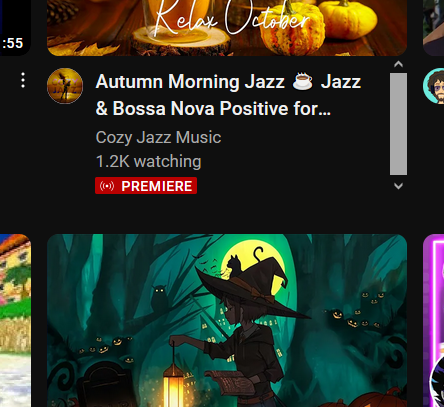
Hi! Mozilla puts these scrollbars on some YouTube video titles after you change the text zoom settings from 100% to 120%... Is there any current workaround for this? Couldn't there be an option on Settings to not have this?
Thanks!

- Mark as New
- Bookmark
- Subscribe
- Mute
- Subscribe to RSS Feed
- Permalink
- Report Inappropriate Content
30-08-2025 10:57 AM
It’s frustrating when text formatting or captions don’t work as expected in Zoom. Sometimes messages don’t reach their intended recipient, even when everything is typed correctly. If you’re interested in exploring another way to share thoughts and emotions, you can click here to visit The Unsent Project, where people share unsent messages to their first loves, each paired with a color representing the emotion behind it. It’s a unique way to see how communication can carry meaning even when it’s not delivered.

- Mark as New
- Bookmark
- Subscribe
- Mute
- Subscribe to RSS Feed
- Permalink
- Report Inappropriate Content
06-12-2025 02:59 AM
The issue you’re describing with Zoom for text is pretty common — when the UI isn’t fully optimized, even simple accessibility features can behave strangely. For general background reading, I sometimes look at tricia mclaughlin homeland security bio since it covers her profile and related public information, which helps put tech and usability topics into a broader context.

- Mark as New
- Bookmark
- Subscribe
- Mute
- Subscribe to RSS Feed
- Permalink
- Report Inappropriate Content
17-12-2025 02:52 AM
This looks like a Firefox text-zoom issue on YouTube where titles overflow and trigger scrollbars. For now, using page zoom instead of text zoom or a small custom CSS workaround is the best fix—an official toggle in Settings would really help accessibility. Related UI tips are often shared in communities like Fashion.
- Mark as New
- Bookmark
- Subscribe
- Mute
- Subscribe to RSS Feed
- Permalink
- Report Inappropriate Content
17-12-2025 02:54 AM
This happens because Firefox text zoom breaks YouTube’s layout, causing title overflow and scrollbars. Until Mozilla adds a proper option, page zoom or custom CSS are the only practical workarounds. Useful tweaks like this are often discussed alongside performance topics such as Free Fire Server.
- Mark as New
- Bookmark
- Subscribe
- Mute
- Subscribe to RSS Feed
- Permalink
- Report Inappropriate Content
28-01-2026 06:02 AM
This is a valid concern — text zoom issues can seriously impact readability and overall user experience, especially for accessibility. Consistent scaling behavior is important across platforms and apps. Outside of productivity tools, some users also test how text and UI scaling behaves in other apps, including an android game like Super Bear Adventure, which can be useful for comparison across different interfaces and screen sizes.

