- Mozilla Connect
- Discussions
- Re: Firefox: Safe or unsafe website?
- Subscribe to RSS Feed
- Mark Topic as New
- Mark Topic as Read
- Float this Topic for Current User
- Bookmark
- Subscribe
- Mute
- Printer Friendly Page
Firefox: Safe or unsafe website?

- Mark as New
- Bookmark
- Subscribe
- Mute
- Subscribe to RSS Feed
- Permalink
- Report Inappropriate Content
30-12-2023 04:53 PM
Why does Firefox say my website is unsafe, when in fact it's not?
Other web browsers such as Chrome, Edge and Opera (all for Windows) as well as Safari (for iOS), says my website is safe, because it is. Of course, I have tested it on a couple of test sites and it scores a perfect 100% on safety. Just not in Firefox. As an amateur web designer it puzzles me quite a lot why this is. Please help me if you can!
Happy New Year!

- Mark as New
- Bookmark
- Subscribe
- Mute
- Subscribe to RSS Feed
- Permalink
- Report Inappropriate Content
31-12-2023 07:37 AM
Differences in security settings, SSL certificate validity, mixed content, and browser-specific algorithms can lead to variations in how browsers, like Firefox, assess website safety. Check SSL certification, address mixed content, and ensure no reported issues to address potential discrepancies. Happy New Year!
- Mark as New
- Bookmark
- Subscribe
- Mute
- Subscribe to RSS Feed
- Permalink
- Report Inappropriate Content
07-01-2024 01:29 PM
Thank you, smithgeorge550.
I have checked my SSL certificate and it seems to be fine. Something else is not right on Firefox.
Do you know if anyone from Mozilla is looking into it?

- Mark as New
- Bookmark
- Subscribe
- Mute
- Subscribe to RSS Feed
- Permalink
- Report Inappropriate Content
14-04-2024 10:04 AM
@Bo422 wrote:I have checked my SSL certificate and it seems to be fine. Something else is not right on Firefox.
Do you know if anyone from Mozilla is looking into it?
There are lot of different possible issues, so the starting point would be exactly what message you are seeing. For example: unable to connect (look for an Advanced button to access more detail), red warning page (SafeBrowsing detection of phishing or malware), mixed content warning (example elsewhere in this thread), or something else.
- https://support.mozilla.org/kb/secure-connection-failed-firefox-did-not-connect
- https://support.mozilla.org/kb/how-does-phishing-and-malware-protection-work

- Mark as New
- Bookmark
- Subscribe
- Mute
- Subscribe to RSS Feed
- Permalink
- Report Inappropriate Content
03-02-2024 05:50 AM
Hard to comment without URL. Could you at least paste screenshot of how certificate looks in Firefox and any error if there is one? Who is the certificate issuer?

- Mark as New
- Bookmark
- Subscribe
- Mute
- Subscribe to RSS Feed
- Permalink
- Report Inappropriate Content
12-04-2024 06:45 PM
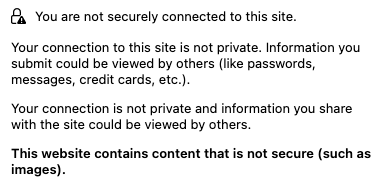
Here is one that shows security issues on Firefox but on no other browser - You can see the lock icon with a triangle and an exclamation point in it, which indicates insecure images? Neither Safari or Chrome or Opera or Edge does this. This is with Mac Sonoma 14.4.1.
- Mark as New
- Bookmark
- Subscribe
- Mute
- Subscribe to RSS Feed
- Permalink
- Report Inappropriate Content
12-04-2024 10:55 PM
Hello
Apparently
Mixed content blocking in Firefox https://support.mozilla.org/en-US/kb/mixed-content-blocking-firefox
A padlock with a triangle
Browser Console
https://firefox-source-docs.mozilla.org/devtools-user/browser_console/index.html
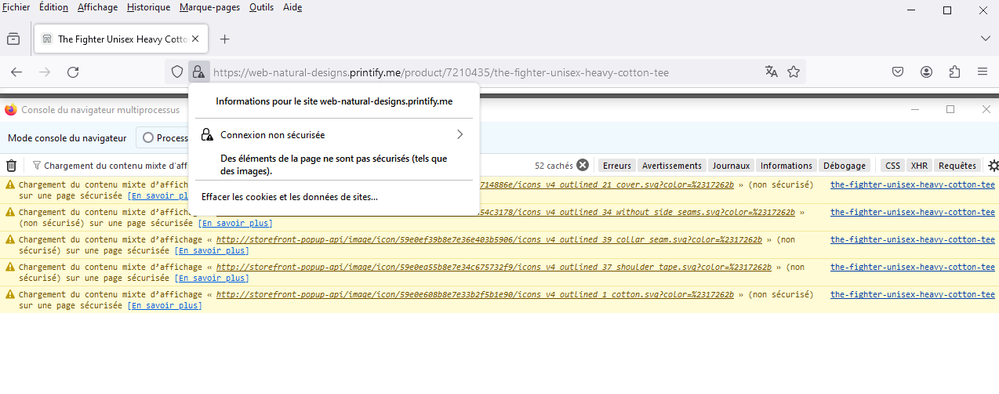
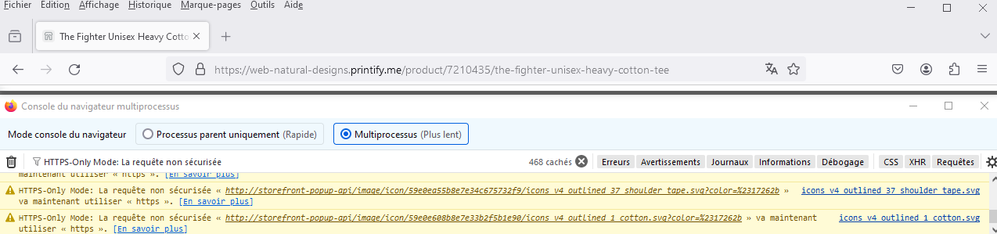
Try
HTTPS-Only Mode in Firefox https://support.mozilla.org/en-US/kb/https-only-prefs

- Mark as New
- Bookmark
- Subscribe
- Mute
- Subscribe to RSS Feed
- Permalink
- Report Inappropriate Content
12-04-2024 10:57 PM - edited 12-04-2024 10:58 PM
It would be helpful if you actually clicked on the padlock to display the reason for the warning icon.

- Mark as New
- Bookmark
- Subscribe
- Mute
- Subscribe to RSS Feed
- Permalink
- Report Inappropriate Content
13-04-2024 01:49 PM

- Mark as New
- Bookmark
- Subscribe
- Mute
- Subscribe to RSS Feed
- Permalink
- Report Inappropriate Content
14-04-2024 01:54 AM
Hello
Firefox release notes
https://www.mozilla.org/en-US/firefox/releases
About Unblock mixed content
https://support.mozilla.org/en-US/kb/mixed-content-blocking-firefox#w_unblock-mixed-content
Other example and illustration
https://website-archive.mozilla.org/www.mozilla.org/firefox_releasenotes/en-us/firefox/releases/0.1
And try HTTPS-Only Mode in Firefox
https://support.mozilla.org/en-US/kb/https-only-prefs


- Mark as New
- Bookmark
- Subscribe
- Mute
- Subscribe to RSS Feed
- Permalink
- Report Inappropriate Content
14-04-2024 10:41 AM
Hello
In addition to jscher2000
About SafeBrowsing detection of phishing or malware
Take a look https://connect.mozilla.org/t5/discussions/google-blocked-direct-access-to-our-site-in-firefox/m-p/5...

- How can I improve Firefox privacy when browsing review websites? in Discussions
- Firefox Ublock Origin in Discussions
- Removing the Clear Cache option on Firefox is a retrograde step and a disadvantage for those with visual impairements in Discussions
- VPN Country selection in Discussions
- Firefox Frequently Fails to Fully Load Web Pages in Discussions
