- Mozilla Connect
- Discussions
- Re: Again clean new tab home screen please!
- Subscribe to RSS Feed
- Mark Topic as New
- Mark Topic as Read
- Float this Topic for Current User
- Bookmark
- Subscribe
- Mute
- Printer Friendly Page

- Mark as New
- Bookmark
- Subscribe
- Mute
- Subscribe to RSS Feed
- Permalink
- Report Inappropriate Content
20-05-2026 08:55 PM
I was supper happy of the clean new tab home screen until recently (Today morning after FF update) again something pops up at the top. Yes, please... it's the Firefox logo with Firefox text. Please make a way to remove this please.
Solved! Go to Solution.
- Labels:
-
Design


- Mark as New
- Bookmark
- Subscribe
- Mute
- Subscribe to RSS Feed
- Permalink
- Report Inappropriate Content
21-05-2026 12:41 AM
Other test
First, you can test
https://connect.mozilla.org/t5/discussions/latest-update-5-19-2026/m-p/125854/highlight/true#M49683
browser.newtabpage.activity-stream.nova.enabled false
Then
browser.newtabpage.activity-stream.logowordmark.alwaysVisible false

- Mark as New
- Bookmark
- Subscribe
- Mute
- Subscribe to RSS Feed
- Permalink
- Report Inappropriate Content
21-05-2026 12:58 AM
- Mark as New
- Bookmark
- Subscribe
- Mute
- Subscribe to RSS Feed
- Permalink
- Report Inappropriate Content
20-05-2026 10:49 PM - edited 20-05-2026 11:08 PM
Hello
Similar requests
For information, with the help of userContent.css file, you can find tutorials on the web.
https://connect.mozilla.org/t5/discussions/giant-logo/m-p/111993/highlight/true#M43314
Below, a test with the help of userContent.css

- Mark as New
- Bookmark
- Subscribe
- Mute
- Subscribe to RSS Feed
- Permalink
- Report Inappropriate Content
21-05-2026 12:41 AM
Other test
First, you can test
https://connect.mozilla.org/t5/discussions/latest-update-5-19-2026/m-p/125854/highlight/true#M49683
browser.newtabpage.activity-stream.nova.enabled false
Then
browser.newtabpage.activity-stream.logowordmark.alwaysVisible false
- Mark as New
- Bookmark
- Subscribe
- Mute
- Subscribe to RSS Feed
- Permalink
- Report Inappropriate Content
21-05-2026 12:58 AM
Try, only, browser.newtabpage.activity-stream.nova.enabled false
- Mark as New
- Bookmark
- Subscribe
- Mute
- Subscribe to RSS Feed
- Permalink
- Report Inappropriate Content
21-05-2026 01:15 AM
Fast and clean solution, thanks.
- Mark as New
- Bookmark
- Subscribe
- Mute
- Subscribe to RSS Feed
- Permalink
- Report Inappropriate Content
27-05-2026 12:06 AM

- Mark as New
- Bookmark
- Subscribe
- Mute
- Subscribe to RSS Feed
- Permalink
- Report Inappropriate Content
10-06-2026 09:15 AM
I understand your frustration with the new Firefox update and the unwanted logo on the home screen. It's always annoying when changes disrupt our browsing experience. Hopefully, they will provide an option to customize it soon. In the meantime, if you're looking for a fun distraction, check out poople game for some entertaining gameplay!

- Mark as New
- Bookmark
- Subscribe
- Mute
- Subscribe to RSS Feed
- Permalink
- Report Inappropriate Content
09-07-2026 03:42 AM - edited 09-07-2026 03:43 AM
I can understand why you'd want the old clean New Tab page back. A lot of people prefer a distraction-free start page, especially if they've been using it that way for a long time.
If this started immediately after the Firefox update, it's likely a design change rather than a problem with your browser. I'd check Settings, Home to see if any new customization options are available, but if there isn't a setting to hide the logo yet, your best option is to leave feedback here on Mozilla Connect. If enough users request it, Mozilla may consider adding a toggle to restore the previous clean layout in a future update.
- Mark as New
- Bookmark
- Subscribe
- Mute
- Subscribe to RSS Feed
- Permalink
- Report Inappropriate Content
09-07-2026 04:22 AM - edited 09-07-2026 04:24 AM
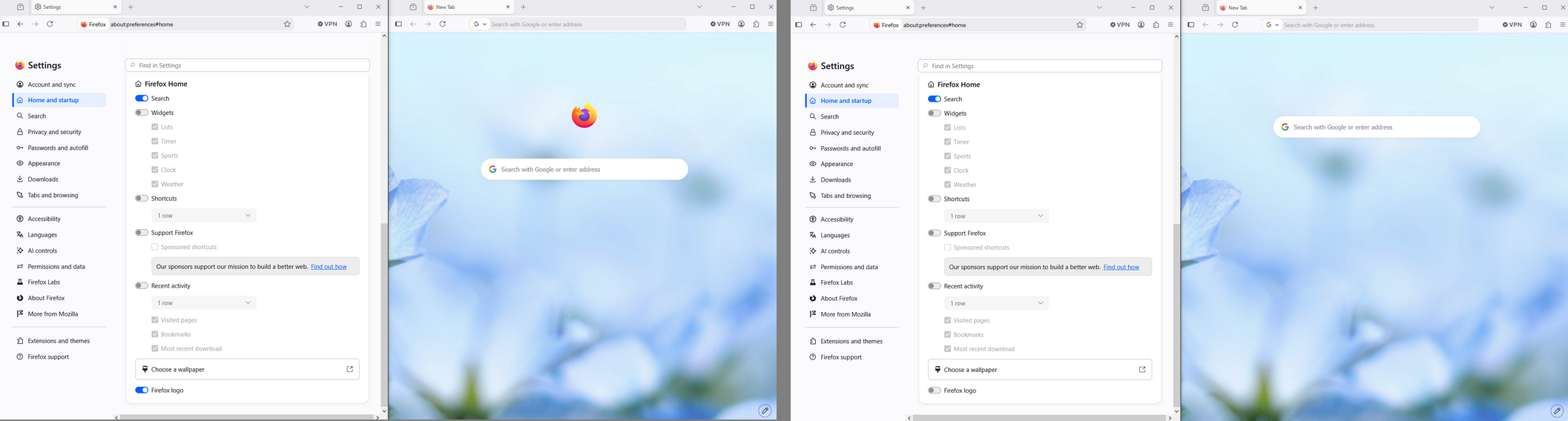
Hello
If the preferences are modified, please, reset the preferences to its default value, click the Reset button
browser.newtabpage.activity-stream.nova.enabled
browser.newtabpage.activity-stream.logowordmark.alwaysVisible
Then, now, you can try, disable Search

- Mark as New
- Bookmark
- Subscribe
- Mute
- Subscribe to RSS Feed
- Permalink
- Report Inappropriate Content
09-07-2026 05:19 AM

- Mark as New
- Bookmark
- Subscribe
- Mute
- Subscribe to RSS Feed
- Permalink
- Report Inappropriate Content
22-07-2026 04:58 AM
I noticed the same thing after the latest Firefox update. I also preferred the cleaner new tab page without the Firefox logo and text at the top. Hopefully Mozilla adds an option to hide it so users can choose the layout they prefer. Having more customization options would definitely improve the overall experience. I'd be interested in reading the official guidance if Mozilla shares any updates on this feature.
- Mark as New
- Bookmark
- Subscribe
- Mute
- Subscribe to RSS Feed
- Permalink
- Report Inappropriate Content
22-07-2026 05:59 AM
Hello
Type about:preferences#home into your address bar
See Firefox Home
About, the Firefox logo, the preference, browser.newtabpage.activity-stream.hideLogo
https://connect.mozilla.org/t5/discussions/firefox-151-introduces-a-fresh-new-look-for-home-amp-new-...
Go to configuration editor https://support.mozilla.org/en-US/kb/about-config-editor-firefox
Enter a search term browser.newtabpage.activity-stream.hideLogo
Illustration below
Firefox logo disabled

- Mark as New
- Bookmark
- Subscribe
- Mute
- Subscribe to RSS Feed
- Permalink
- Report Inappropriate Content
01-08-2026 11:27 AM
This option is so much better than having the option of selecting Pride (LGBTQ+) for the icon. It is where 2017's and 2004's icons where better than today's, too. Who agrees?

- Clean up the number of ways to not store, or clear, history in Discussions
- Block websites forcing Firefox into full-screen mode in Discussions
- Updated History Bar is Slow and Lags in Discussions
- Help us test: seeing when you last visited a page suggested by the search bar in Discussions
- Terrible Firefox Speed in Discussions
